
Ryan Bourne

10 min read
8th Sep, 2025
Patching an Android crash in React Native
At Peslo, we're not scared of diving into complicated problems and finding solutions. It's one of the reasons our clients choose us - we have a proven track record in finding proper solutions to complex problems, even in spaces we've not previously worked in. From building a complete Tap and Pay solution, to supporting EVSE devices to make EV charging more equitable, and handling complex email data to help plant trees, we're comfortable with the complex.
So when we noticed an Android crash in one of our apps for VIKIN, a spinoff startup from Peslo, we dove straight in to working out the problem.
The Problem
We saw initially in our automated crash reporting that certain installations were crashing on launch. It was not crashing on every device, and the vast majority of the user-base was not impacted. As well as some crash logs raising this issue in Google Play Console, we also had users reach out to us to report that they were unable to use the app. As part of our support process at VIKIN, we always ask for some key details - an anonymous user ID so we can view the user's logs, their device make / model, and the version of the OS installed on their device.
With the crash logs, user logs, and user reports, we were able to establish that this crash was specific to devices using armeabi-v7 32-bit CPUs. Devices using more modern 64-bit CPUs were not impacted. Specifically, Samsung A13 devices were most frequently reported as experiencing crashes.
Knowing this, and knowing that we'd recently upgraded React Native to a more modern version (alongside some other frameworks for handling mapping, notifications, animations and more), we started digging into the issue with an initial hypothesis that either our version of React Native had an issue, or another framework we were using had an issue.
During our research, we found these links:
https://github.com/facebook/react-native/issues/49510
https://github.com/facebook/react-native/issues/51628#issue-3094045077
"After testing the latest RC and nightly builds, crash appeared when emitting events from turbo modules on 32bit Android devices. The crash is always reproducible only on 32bit devices on signed production builds."
Bingo.
This was a known issue with React Native, that others had stumbled upon before us. Typically when a new version of React Native is released, we wait for a few weeks before upgrading so that any new issues are caught and fixed before we upgrade, so others were already investigating the problem.
One community member found this:
"From what I found, the variadic functions like CallVoidMethod are unsafe on 32bit due to not type checking the passed arguments at compile time. As far as I understand the 64bit cpus and ABIs are more forgiving with alignment and calling conventions. On 32bit the ABIs are strict as arguments are passed on the stack and if there is type/size/alignment issue it reads the wrong memory, which causes the SIGEGV crashes."
Essentially, a function call that worked fine on newer 64-bit CPUs would crash on 32-bit devices. But thankfully, this was already patched in React Native's 0.80.x releases - so we'd just need to update to that and our problems would be cured.
But no - they were not cured. On upgrading to React Native's 0.80.x release, which was still pretty new at the time we tried, we faced many issues with incompatibilities with our other frameworks, and we had a low level of confidence that the app would be stable at all even if we fixed the issues we knew about. With our next event just a matter of weeks away, we had to try something else to ensure the app would be stable on all devices.
Adding our own patch
Community members had already created a fix for this issue here: https://github.com/facebook/react-native/pull/52377/files, and in theory we should be able to add this fix to the React Native code in our project, and then the problem is fixed! Right?
Except, there's a few things to consider:
- React Native is installed via 'yarn', so any patches we add would be removed when the library is installed / updated.
- We do not check 'node_modules' into source-control, so a patch applied locally would not be available on other machines.
- We build our app using a CI/CD environment which utilises fresh VMs for each build - meaning we'd need to reapply the patch every time, or change our CI/CD environment.
- Whilst others had reported the patch worked, others had stated it caused issues with other frameworks, and that it wasn't stable enough to use.
But ultimately, the biggest issue was that we'd need to swap our React Native installation to 'build from code', instead of using the prebuilt binaries that React Native provides. By default, to speed up build times, the React Native team pre-build the framework and then distribute the pre-built framework files to developers. This means that for every build you make, you don't need to rebuild the React Native core codebase. To use our patch, we'd need to:
- Start building 'from code', rather than using React Native's pre-built libraries, this is documented here: https://reactnative.dev/contributing/how-to-build-from-source
- Add our patch to React Native
- Use `patch-package` to create a git diff of the fix, which'd be reapplied automatically after `yarn` is run
This'd mean our patch would be applied in our CI/CD environment, so builds could then run and we'd have a fixed Android app!
So we did this, ran our next CI build and waited.
Nothing.
The build timed out at 30 minutes, without it being anywhere close to complete. Our typical Android build time is ~12 minutes.
The reason why React Native is distributed as pre-built framework files is because it is massive and compiling it takes a significant amount of time. We needed to find another way.
We thought that if the React Native team could pre-build React Native, then surely we could too?
Pre-building React Native ourselves
We started to take a look around for any documentation that might help us, but through our research we found very little guidance available. We then decided to go off the beaten track and experiment with some different approaches, and in the end we found something that worked.
Firstly, fork the React Native repo, and swap to the stable release branch for the version you're trying to patch. Create a branch off of that version for your fix, and apply your fix to that branch.
Then, in the root folder of the React Native repo, run
./gradlew packages:react-native:ReactAndroid:bundleDebugAar
./gradlew packages:react-native:ReactAndroid:bundleReleaseAar
./gradlew packages:react-native:ReactAndroid:hermes-engine:bundleDebugAar
./gradlew packages:react-native:ReactAndroid:hermes-engine:bundleReleaseAar
Wait for these to complete, these will generate the .aar files that contain the pre-compiled React Native code. Then, run these commands to get these to sit within your 'maven local' repository:
./gradlew packages:react-native:ReactAndroid:publishToMavenLocal
./gradlew packages:react-native:ReactAndroid:hermes-engine:publishToMavenLocal
These will (at least, on Mac), sit at this path: '~/.m2/repository'.
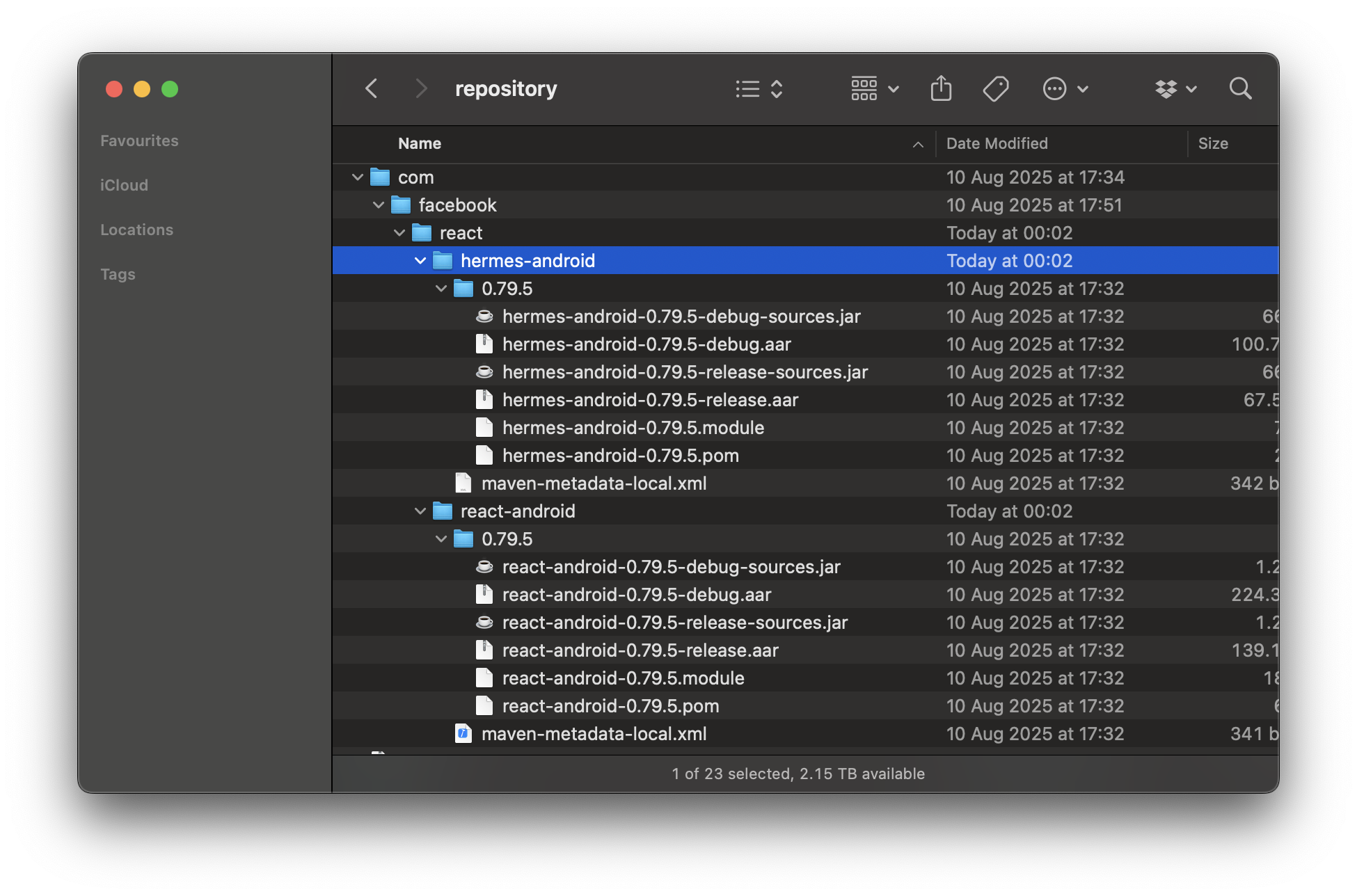 Here they are!
With these files now sat in the 'mavenLocal' repository, we can now point our app project to use these.
In 'android/build.grade', our 'allprojects' config was updated to include 'mavenLocal()' at the top like this:
allprojects {
    repositories {
        mavenLocal()
        ...
    }
}
And our 'buildscript' config was updated to include 'mavenLocal()' at the top like this:
buildscript {
    ext {
        ...
    }
    repositories {
        mavenLocal()
        ...
    }
    ...
 }
This ensures that when React Native is built, our local .aar files are referenced instead of the ones held on the 'google()' or 'mavenCentral()' repositories.
After clearing the gradle caches, Android Studio caches, and trying a good ol' restart of Android Studio, we saw that our .aar files were being used.
🎉🎉🎉
Whilst this fixed the issue on one Macbook, it didn't fix the issue for the other developer in the team, nor did it fix our CI/CD pipeline. As our team is small, we ran the same commands on our other devices so that the full team were on the fixed version. But, this didn't fix our CI/CD pipeline...
Making the pre-built libraries portable
We needed to bring these .aar files with us into our Bitrise CI/CD workflow, so our automated builds would include our fixed version of React Native. But with 'mavenLocal' being at a specific location in the filesystem, and with the .aars zipped being over 500mb, we knew we'd need a specific approach.
In the end, we decided to zip up the .aar files, and upload them to a Google Drive folder. This folder contains only the zipped pre-built .aar files, and it can be accessed via a URL. Then, in our Bitrise CI pipeline, we added a small script that would download the .zip file from Google Drive, create the 'mavenLocal' repository folder in the CI machine's filesystem, and unzip the downloaded archive to the correct location:
#!/usr/bin/env bash
# fail if any commands fails
set -e
# make pipelines' return status equal the last command to exit with a non-zero status, or zero if all commands exit successfully
set -o pipefail
# debug log
set -x

# Install gdown
pip install gdown

# Download our massive mavenLocal zip file
gdown <our special link id>

# Create the mavenLocal repository folder
mkdir -p ~/.m2/repository

# Unzip our aar folder to the repository
unzip -o com.zip -d ~/.m2/repository
Firstly, we install 'gdown', a command line tool for interacting with Google Drive. This is because for larger files, you cannot easily download a file from Google Drive via a link. 'gdown' handles the complexity for us. We then download the file with our file ID, create the mavenLocal repository folder, and unzip our .aar zip to the right location.
We ran a build, and we waited...
Success ✅ The build passed, and we could install it and run it on our phones.
We completed extensive testing of the build on all of the Android devices we had to hand, and our complete set of regression tests passed. But, we didn't have any 32-bit devices to hand, and seeing the app running on those was the only way to know we'd fully fixed this issue.
We then made the decision to invite some of the users who reported the crash to a small Google Play testing team, where we could then upload a hopefully-fixed version. We're very grateful that some users did accept our invite to join, and after testing the app, we were very happy to hear from them that the app was now working on their devices! During the event, we did not see any reoccurrence of the armeabi-v7 crash.
A few days after we fixed this and completed our testing, the React Native team back-ported the fix to 0.79.6, meaning that whilst we had fixed the problem ourselves, if we'd have waited a few more days, we would have just needed to change our react-native version from 0.79.5 to 0.79.6 and got the fix for free...
To conclude...
We're happy that we were able to fix the issue after a great deal of experimentation, and that we've been able to document our approach. We hope others in the future find this helpful!
Next...
Looking for a consultancy to enhance and improve your mobile app? Take a look at our other projects!
Got an idea for a new app to improve our world? Reach out to us!
Share


